
How to Edit Quantity or Swap a ProductUpdated 10 days ago
Whether you need more or less of a product or are ready to try a new flavour or format, you can update your subscription at any time before your next order is processed.
Change your quantity
Log in to your account here.
Find your upcoming order.
Select the product you'd like to update.
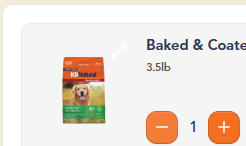
Use the + or - buttons to adjust the quantity to suit your pet's needs.
Your changes save automatically, and you'll see the updated order total reflected right away.

Swap a product
Log in to your account here.
Find your upcoming order and select “Swap”.
Browse the available options. You can switch between flavors, formats (e.g. Freeze-Dried, Baked & Coated, Canned), or sizes.
Select your new product and confirm the swap.
Your change will apply to this order and future orders until you choose to update it again.
Note: Swaps and quantity changes only affect deliveries that haven't been processed yet.